queuedAccepted and waiting for backend capacity.

Python Client 2.0 · API v2
Submit BPX models, follow a run from queue to completion, inspect logs, and load only the result fields your analysis needs.
https://api.dandeliion.com01
You need a DandeLiion API token and a valid BPX v0.5 file. Keep the token in an environment variable so it never appears in source code or notebooks.
python -m pip install "dandeliion-client>=2,<3"import os
import dandeliion.client as dandeliion
simulator = dandeliion.Simulator(
"https://api.dandeliion.com",
os.environ["DANDELIION_API_KEY"],
)
params = "cell.bpx.json"
solution = dandeliion.solve(
simulator=simulator,
params=params,
is_blocking=True,
)
print(solution.status)
if solution.status == "succeeded":
print(f"Final voltage: {solution['Voltage [V]'][-1]:.3f} V")
else:
print(solution.log)succeeded
Final voltage: 2.000 V02
Client 2.0 supports Python 3.10 through 3.13; Python 3.14 is excluded by
the published package. Check python --version and select a supported
interpreter before creating the environment (for example, python3.13).
A virtual environment keeps its packages separate from the rest of your system.
python -m venv .venv
source .venv/bin/activate
python -m pip install --upgrade pip
python -m pip install "dandeliion-client>=2,<3"
On Windows PowerShell, activate with .venv\Scripts\Activate.ps1
instead of source .venv/bin/activate. In a notebook, select this
environment’s kernel. The base install includes NumPy and the BPX validator.
For the plotting examples in section 8, install matplotlib in the same environment:
python -m pip install matplotlib
Install the PyBaMM extra if you want PyBaMM to validate experiment
instructions and construct drive-cycle steps. String experiments and raw
time-series input also work without it. Installing the extra makes
dandeliion.Experiment an alias for pybamm.Experiment.
PyBaMM validates syntax; it does not guarantee support for every PyBaMM option
in DandeLiion’s models. Matplotlib remains a separate install.
python -m pip install "dandeliion-client[pybamm]>=2,<3"Confirm the installed client before submitting a run:
import dandeliion.client as dandeliion

print(dandeliion.__version__)
# 2.0.0
03
Create or obtain a token through the DandeLiion Token Portal. API v2 tokens contain exactly 64 lowercase hexadecimal characters. Treat the token like a password: do not commit, log, print, or place it directly in a notebook.
import os

import dandeliion.client as dandeliion

simulator = dandeliion.Simulator(
    api_url="https://api.dandeliion.com",
    api_key=os.environ["DANDELIION_API_KEY"],
)
The service root, /api/v2, or the complete
/api/v2/runs collection URL are accepted. Client 2.0 rejects
legacy /v1 URLs and requires HTTPS except for localhost.
All five settings below are optional. The values shown are
the defaults, so the two-argument Simulator above is sufficient.
Set them only when you want to change network waits, polling, or retries.
All durations are in seconds.
simulator = dandeliion.Simulator(
    "https://api.dandeliion.com",
    os.environ["DANDELIION_API_KEY"],
    request_timeout=(3.05, 30),
    result_timeout=(3.05, 300),
    poll_interval=1,
    max_poll_interval=10,
    max_attempts=3,
)| Setting and default | Meaning |
|---|---|
request_timeout=(3.05, 30) | Connection timeout, then read-inactivity timeout, for submissions, status, logs, and cancellation. |
result_timeout=(3.05, 300) | Connection timeout, then read-inactivity timeout, for selected fields and full result downloads. A download may take longer overall while bytes keep arriving. |
poll_interval=1 | Initial delay between status requests during blocking solve() or join(). A status change resets the delay. |
max_poll_interval=10 | Maximum delay between unchanged status polls. The client multiplies the delay by 1.5 until it reaches this limit. Must be at least poll_interval. |
max_attempts=3 | Total attempts per retryable HTTP request, including the first: at most two retries. Transport failures and selected temporary HTTP errors can be retried; validation errors and authorization_unknown are not. This does not limit the number of status polls. |
These settings do not change the remote simulation deadline. Use
solution.join(timeout=60) to limit a local wait; individual HTTP
requests still use their own timeouts. That wait does not cancel the run.
Reading solution.status manually does not add a polling delay.
04
Pass a BPX filename or pathlib.Path, a valid BPX dictionary,
or an in-memory BPX object returned by bpx.parse_bpx_file().
The client uses BPX v0.5 to validate input before submission;
this is the validator version, not a requirement to rewrite the file’s header.
Extra parameters override matching DandeLiion: entries in the BPX
Parameterisation → User-defined section. Do not add that prefix
yourself inside extra_params. The BPX validator does not check
every custom model option; a model rejection after acceptance still uses one token use.
params = "cell.bpx.json"

extra_params = {
    "Mesh": {"x_n": 16, "x_s": 16, "x_p": 16, "r_n": 16, "r_p": 16},
    "Initial SOC": 1.0,
    "extra_resources": False,
}| Parameter | Purpose |
|---|---|
Mesh |
Mesh points for x_n, x_s, x_p, r_n, and r_p. Each defaults to 16 and must be at least 4. |
Initial SOC |
Initial state of charge from 0 to 1. The default is 1. |
Initial voltage [V] |
Initial single-cell voltage between the BPX cell voltage limits; Module uses this per series cell. Remove Initial SOC when setting this option, because SOC takes precedence. |
Time series input |
Time in seconds plus exactly one of Current [A] or Power [W]. Use equal-length, finite arrays with at least two samples and strictly increasing times; start at zero. Negative values discharge, positive values charge. |
Lumped thermal model |
Enables lumped thermal behaviour; required material properties come from the BPX cell section. In models v0.4.0, omit this key for an isothermal run: even False selects the lumped model. |
Heat transfer coefficient [W.m-2.K-1] |
Non-negative coefficient for the lumped thermal model. It defaults to zero (no heat exchange); set it explicitly when modelling cooling. |
Module |
Battery-pack geometry and model parameters. |
Safe mode |
Selects the solver’s safe mode, with additional convergence checks and a possible performance cost. In models v0.4.0, the presence of this key enables it even if set to False; omit the key to use the default fast mode. |
extra_resources |
Optional boolean, default False (Lambda). Set True for Fargate when the run may exceed Lambda’s 15-minute or approximately 3 GB limits. Fargate has a longer startup delay and a configured maximum runtime of 12 hours. |
Cell section.Electrolyte section.DandeLiion: Initial SOC or
DandeLiion: Initial voltage [V] in
User-defined, or pass the unprefixed key through
extra_params.
05
Use dandeliion.Experiment without PyBaMM, or
pybamm.Experiment when the optional dependency is installed.
Adapt the example voltage limits to your BPX cell. Explicit
experiment targets can exceed the BPX cutoffs, so choose suitable targets yourself.
experiment = dandeliion.Experiment(
    [
        (
            "Discharge at 1C until 3.2 V",
            "Hold at 3.2 V for 1 minute (5 second period)",
            "Rest for 30 seconds",
            "Charge at 2000 mA for 1 minute or until 3.6 V",
        )
    ],
    period="10 s",
)Choose this example in an environment without PyBaMM. Use a two-column CSV file containing time in seconds and current in amps. This example assumes positive current in the CSV means discharge, so it negates the current column for DandeLiion’s negative-discharge convention. It starts at 60% SOC and repeats the profile twice. If your data already uses negative discharge, omit the negation.
import numpy as np

data = np.loadtxt("drive_cycle.csv", delimiter=",", comments="#")
drive_cycle = np.column_stack([data[:, 0], -data[:, 1]])

experiment = dandeliion.Experiment([("Time series",) * 2], period="10 s")
extra_params = {
    "Initial SOC": 0.6,
    "Time series input": {
        "Time [s]": drive_cycle[:, 0].tolist(),
        "Current [A]": drive_cycle[:, 1].tolist(),
    },
}
Choose this alternative when the PyBaMM extra is installed. It embeds the
time series, so start with fresh extra_params and omit
Time series input. Client 2.0 passes step arrays through unchanged:
use DandeLiion’s negative-discharge sign here too, even though PyBaMM’s own
solver normally uses positive discharge. Negate power profiles in the same
way if their source uses positive discharge.
import numpy as np
import pybamm

data = np.loadtxt("drive_cycle.csv", delimiter=",", comments="#")
drive_cycle = np.column_stack([data[:, 0], -data[:, 1]])

experiment = pybamm.Experiment(
    [(pybamm.step.current(drive_cycle),) * 2],
    period="10 s",
)
extra_params = {"Initial SOC": 0.6}
06
dandeliion.solve() converts validated BPX input and the
experiment to the API request. Blocking mode waits for a terminal state;
non-blocking mode returns after the API accepts the submission. Set
is_blocking=True to wait within solve(), or use
False and call join() later as below. Choose one of the
experiment setups in section 5; each example replaces experiment
and the drive-cycle examples also replace extra_params.
solution = dandeliion.solve(
    simulator=simulator,
    params=params,
    experiment=experiment,
    extra_params=extra_params,
    is_blocking=False,
)

print("Run:", solution.run_id)
print("Status:", solution.status)  # May already be running or terminal.
solution.join()
print("Status:", solution.status)
if solution.status != "succeeded":
print(solution.log)Run: <run UUID>
Status: queued
Status: succeededEvery accepted, distinct simulation consumes exactly one Token Portal use. The client automatically generates an idempotency key and reuses it for bounded transport retries. Supply a stable key when your application may repeat the same logical submission later.
# Choose a new key for each distinct simulation. Keep this key for its retries.
submission_key = "analysis-batch-0001"
solution = dandeliion.solve(
    simulator=simulator,
    params=params,
    experiment=experiment,
    extra_params=extra_params,
    is_blocking=False,
    idempotency_key=submission_key,
)
Replaying the same token, canonical input, and key returns the original
run without consuming another use. Reusing the key for different input
raises DandeliionAPIException with
code == "idempotency_conflict". Polling, logs, result
downloads, and cancellation do not consume additional uses.
This is a snapshot from the accepted submission, not a fresh token check.
valid should be True, status should be
"valid", and uses_remaining is the shared balance
after that submission. expires_at is timezone-aware when present.
Replaying an old run returns its original snapshot; polling cannot tell you
the token’s current balance. Use the Token Portal for that. Reading this
property consumes no use and never returns the token itself.
validation = solution.token_validation
if validation is not None:
    print("Valid:", validation.valid)
    print("Status:", validation.status)
    print("Expires at:", validation.expires_at)
    print("Uses remaining after submission:", validation.uses_remaining)
07
Reading solution.status refreshes non-terminal runs.
solution.join(timeout=...) waits with bounded polling and
raises DandeliionTimeoutError if the local wait expires.
Blocking solve() and join() also return normally for
failed, cancelled, and timed-out runs; check solution.status
before reading results. join() returns None.
queuedAccepted and waiting for backend capacity.
runningExecuting on Lambda or Fargate.
cancel_requestedCancellation is being applied.
succeededA usable result is available; it may be complete or partial.
failedStopped with an error; inspect the log.
cancelledCancellation reached a terminal state.
timed_outExceeded the backend runtime limit.
solution.log retrieves new bounded log chunks and returns all
text collected by that solution object so far. It can be called while the
run is active. Logs can arrive in batches and may initially be empty, even
just after a fast run becomes terminal; read again shortly afterwards.
The local object keeps all fetched log text in memory. This loop prints only
newly received characters and makes a final delayed read.
import time

printed = 0
terminal_states = {"succeeded", "failed", "cancelled", "timed_out"}
while True:
    text = solution.log
    print(text[printed:], end="", flush=True)
    printed = len(text)
    if solution.status in terminal_states:
        break
    time.sleep(1)

# Log visibility can lag the final status; repeat later if needed.
time.sleep(2)
text = solution.log
print(text[printed:], end="", flush=True)Your simulation is now running on AWS Lambda.
[2026-09-15 13:22:12.401] [info] Starting dandeliion-models v0.4.0...
[2026-09-15 13:22:12.406] [info] BPX Model: DFN
[2026-09-15 13:22:12.411] [info] Thermal model: Isothermal
[2026-09-15 13:22:12.411] [info] Number of instructions to parse: 4
...
[2026-09-15 13:22:12.486] [info] Simulation completed successfully
[2026-09-15 13:22:12.486] [info] Simulation time: 74.470 ms
[2026-09-15 13:22:12.486] [info] Writing the output to output.h5...
[2026-09-15 13:22:12.632] [info] Output file writing time: 146.524 ms
[2026-09-15 13:22:12.632] [info] Total time: 231.178 ms# Use while the run is queued or running; it may finish before cancellation.
status = solution.cancel()
print(status) # Usually "cancel_requested" or "cancelled"; may already be terminal.
Cancellation is idempotent. A running Lambda invocation may continue at
the provider after the public run becomes cancelled, but its
later output is unavailable as a successful result. Cancellation does not
refund the accepted submission’s use. A run that finishes before the request
arrives keeps its terminal status; cancel a running example before calling
join() if you want to exercise cancellation.
08
Wait for succeeded, then inspect field names from result metadata.
Accessing one field requests that field and Time [s] when needed.
The client materialises and caches each selected array in local memory;
a spatial field can still be large. solution.dump() streams the
complete result to disk. API JSON remains full precision even when the server
stores HDF5; a null result size is normal for these runs.
for key in sorted(solution.keys()):
    print(key)
succeeded means usable output is available, including saved samples
from a solver that stopped early. API metadata reports
artifacts.completion_status as complete,
partial, or null when no result is published.
Client 2.0 has no public completion-status property, so query the run metadata:
import requests

response = requests.get(
    f"https://api.dandeliion.com/api/v2/runs/{solution.run_id}",
    headers={"Authorization": f"Token {os.environ['DANDELIION_API_KEY']}"},
    timeout=(3.05, 30),
)
response.raise_for_status()
metadata = response.json()
print("Completion:", metadata["artifacts"]["completion_status"])
print("Artifacts expire:", metadata["artifacts"]["expires_at"])
Partial results retain every saved sample and support the same plots and
exports. Check their final time and runtime log before interpreting them as
a whole experiment. A complete result may also end at a normal voltage cutoff.
The saved bundle’s result.Header retains Completion status
and Termination reason for offline checks.
Charge [A.h]
Current [A]
Electrolyte concentration [mol.m-3]
Electrolyte potential [V]
Electrolyte x-coordinate [m]
Negative electrode concentration [mol.m-3]
Negative electrode exchange current density [A.m-2]
Negative electrode potential [V]
Negative electrode surface concentration [mol.m-3]
Positive electrode concentration [mol.m-3]
Positive electrode exchange current density [A.m-2]
Positive electrode potential [V]
Positive electrode surface concentration [mol.m-3]
Power [W]
Temperature [K]
Time [s]
Voltage [V]
X-averaged negative electrode concentration [mol.m-3]
X-averaged negative electrode exchange current density [A.m-2]
X-averaged negative electrode potential [V]
X-averaged negative electrode surface concentration [mol.m-3]
X-averaged positive electrode concentration [mol.m-3]
X-averaged positive electrode exchange current density [A.m-2]
X-averaged positive electrode potential [V]
X-averaged positive electrode surface concentration [mol.m-3]
X-coordinate in the negative electrode [m]
X-coordinate in the positive electrode [m]The example output and plots show a two-cycle simulation starting at 60% SOC. Your results will depend on your BPX parameters and drive cycle.
print(f"Final time [s]: {solution['Time [s]'][-1]}")
print(f"Final voltage [V]: {solution['Voltage [V]'][-1]}")
print(f"Final temperature [K]: {solution['Temperature [K]'][-1]}")Final time [s]: 1200.0
Final voltage [V]: 3.2767115813933563
Final temperature [K]: 298.15
One-dimensional fields aligned with Time [s] are callable.
The client performs linear interpolation with constant extrapolation: a query
before or after the saved range returns the first or last value. Stay within
the saved time range when analysing a partial run; extrapolation is not extra
simulated data. Spatial arrays are indexed by time and are not callable.
import numpy as np

t_eval = np.arange(0, 5, 1)
for time, voltage in zip(t_eval, solution["Voltage [V]"](t=t_eval)):
print(f"{time}\t{voltage}")0 3.2855181791739145
1 3.2855089881842403
2 3.285500892843016
3 3.2854935618152186
4 3.285486847318352Install matplotlib as shown in section 2. Current and power are negative during discharge.
import matplotlib.pyplot as plt

fig, axes = plt.subplots(2, 1, figsize=(10, 8))
axes[0].plot(solution["Time [s]"], solution["Current [A]"])
axes[0].set(title="Current [A]", xlabel="time [s]")
axes[1].plot(solution["Time [s]"], solution["Voltage [V]"])
axes[1].set(title="Voltage [V]", xlabel="time [s]")
plt.tight_layout()
plt.show()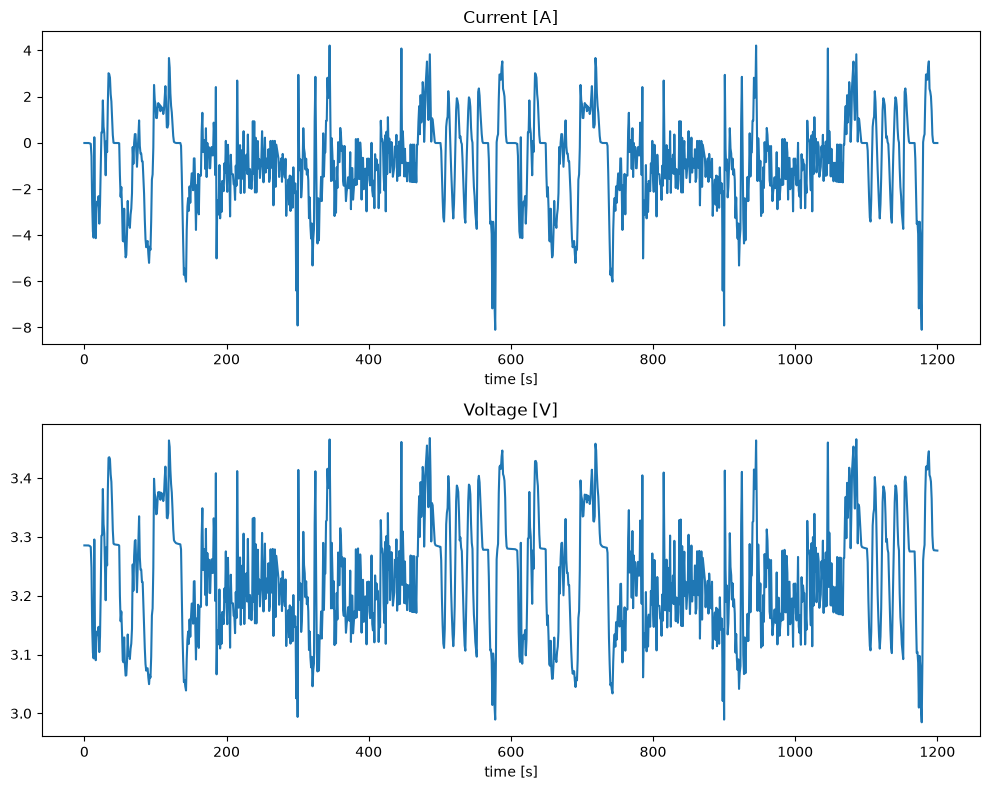
import matplotlib.pyplot as plt

plt.figure()
plt.plot(
    solution["Electrolyte x-coordinate [m]"] * 1e6,
    solution["Electrolyte concentration [mol.m-3]"][-1],
)
plt.xlabel(r"x [$\mu$m]")
plt.ylabel(r"Concentration [mol m$^{-3}$]")
plt.title("Electrolyte concentration at the final saved time")
plt.tight_layout()
plt.show()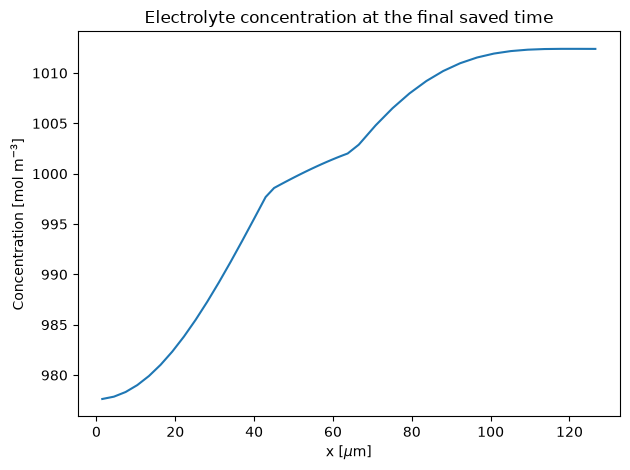
09
Use solution.dump() to save and Simulator.restore()
to load a client v2 bundle. A succeeded run’s bundle contains metadata, logs
available at save time, and the full published result streamed directly to disk,
including Header and all fields even if you accessed only one. This can be a
complete or partial simulation. The client writes atomically without loading
the whole result in memory; the destination directory must already exist.
solution.dump("solution.json")
restored_solution = dandeliion.Simulator.restore("solution.json")

print(restored_solution["Voltage [V]"][-1])
Restored result fields are parsed lazily. A completed bundle works offline
and contains no API token, origin, or reusable server URL. Re-saving an offline
restored bundle works too. This client bundle differs from the raw
Header/Solution JSON returned by the REST result endpoint;
restore() requires a client v2 bundle. To inspect the saved model header:
import ijson

with open("solution.json", "rb") as saved:
    header = next(ijson.items(saved, "result.Header"))
print(header.get("Completion status"))
print(header.get("Termination reason"))
Call dump() immediately after non-blocking submission, before
join(), to save an active run with result: null.
A fast run may already have finished, in which case the saved bundle includes
its result. To reconnect an active bundle, supply the same token that owns the
run and an explicit API URL. A bundle from a partial succeeded run already has
a result and works offline; it does not resume the solver.
solution.dump("incomplete-solution.json")

restored_solution = dandeliion.Simulator.restore(
    "incomplete-solution.json",
    api_url="https://api.dandeliion.com",
    api_key=os.environ["DANDELIION_API_KEY"],
)
restored_solution.join()
print(restored_solution.status)
if restored_solution.status == "succeeded":
restored_solution.dump("completed-solution.json")artifacts.expires_at
in run metadata and save results before expiry for long-term access. A local
bundle with results stays usable offline after server artifacts expire.
10
Token rejections have their own exception type. Other API failures expose
structured context that can be recorded safely for support. BPX and experiment
validation can also raise local ValueError/TypeError
(including BPX validation errors) before any API submission or token use.
A solver failure after acceptance is reported through the run status and log;
it is not automatically raised by blocking solve().
try:
    solution = dandeliion.solve(
        simulator=simulator,
        params=params,
        experiment=experiment,
        extra_params=extra_params,
        is_blocking=False,
        idempotency_key=submission_key,  # Reuse only for this same request.
    )
except dandeliion.DandeliionTokenValidationError as exc:
    print(exc.validation.status)
    print(exc.validation.expires_at)
    print(exc.validation.uses_remaining)
except dandeliion.DandeliionAPIException as exc:
    print(exc.status_code)
    print(exc.code)
    print(exc.request_id)
    print(exc.authorization_request_id)
    print(exc.retry_after)
print(exc.idempotency_key)| Symptom | Action |
|---|---|
| Token invalid, expired, inactive, or exhausted | Inspect DandeliionTokenValidationError.validation and manage the token in the Token Portal. |
idempotency_conflict |
Do not reuse a logical submission key for different parameters. Generate a new key for a distinct simulation. |
authorization_unknown |
Do not resubmit automatically. Give authorization_request_id to support so the possibly consumed use can be reconciled. |
| HTTP 429 | Wait for retry_after. Rate limiting does not consume a portal use. |
DandeliionTimeoutError |
The local wait expired; the remote run may still be active. Check solution.status or cancel explicitly. |
| Missing result field | Inspect solution.keys(); requesting an unknown direct Solution field raises KeyError. |
| Offline incomplete restore | Restore again with both an explicit API URL and API key. |
11
https://api.dandeliion.com/v1 to https://api.dandeliion.com.succeeded instead of success, plus cancellation and timeout states.join() use bounded REST polling.idempotency_key and identical BPX, experiment, and extra parameters. This retrieves the original run if it was accepted, without charging another use. The key is available on solution.idempotency_key or a submission exception’s idempotency_key. For authorization_unknown, stop and contact support instead.solution.dump(). There is no automatic v1-to-v2 conversion.12
The separately hosted client reference still describes client 1.2.0 and
/v1. Use this guide and the versioned 2.0.0 source docstrings
below for API v2.